Welcome to the new Real Estate & Rentals section of the Ventana View. Here you can find community-posted rental and real estate listings. If you are looking for a realtor or a property manager, check the Business Directory. Details on how to add your own listing are at the bottom of the page.
Browse Current Listings
Selected Real Estate…

Ventana Vistas – Prime Double-Wide Beachfront Property Experience breathtaking, inspiring views from this rare double-wide lot boasting 58 meters of pristine oceanfront. Located at the...

Welcome to The Moroccan Palace! Turkish inspiration and Moroccan design in this breathtaking luxury villa of timeless, magical ambiance. A one-of-a-kind gorgeous retreat nestled in...

Front sea Lot in JSargento-Jalito, with title. 5k up north from Tuna beach, Ventana bay, Pacific area, no noises no lights. special to be enjoying...
Selected Rentals…
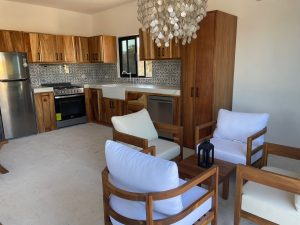
by Tim Hatler
For just $2000/month: Experience the perfect blend of rustic luxury and cozy living space within walking distance to the beach in La Ventana. Casa Bahama...

Casa Pitaya is a brand new, spacious, modern Mexican home in the heart of La Ventana-El Sargento, Baja California Sur. With 3 king bedrooms (each...

by Tim Hatler
Casa Sirena, a stunning rental home in La Ventana offers 4 bedrooms and 1 bath downstairs, plus 1 bed and 1 bath upstairs. Fully furnished...
How To Add Your Own Listing
Rental & Real Estate listings are now a do-it-yourself service. You create your own listing with a title, description and photos (if you like). You can edit it or remove your listing at any time. It will expire in three months if you do not renew it. Here’s how to get started…
- Register & Login – Go to Listing Register. Make sure to use a real email or your listings cannot be approved.
- Submit your Listing – Go to the Add New Listing page and enter all of the information
- Wait for Review – The Ventana View will be notified when your listing is submitted. It will typically be approved in less than 24 hours.
Questions?
- How do I manage my current listing(s)? Go to Manage Listings. If you are not already logged in, you will be asked to log in.
- I forgot my password. What now? Go to Listings Login and click the “Forgot your password?” link.
- Help! This isn’t as easy as you make it out to be! If you get stuck, or just “technology challenged”, send us a message and we can help you out.