Buy, sell or swap goods, lost & found within the La Ventana Community. How does it work?
Wanted
Armstrong Speed 180 Stabilizer
If you know of one, I'd appreciate a heads up. Thanks!
Brently 
7 hours ago
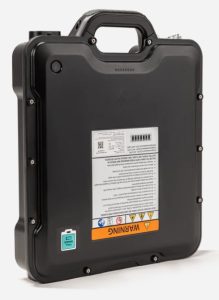
Lift 4th Gen eFoil battery
Looking for a 4th generation full Lift eFoil battery if anyone has one for sale.
I would consider a full set if cannot find the battery itself.
Boris
9 hours ago
Lift 150HA
Wanted: Lift 150 HA
Tumbleweed
9 hours ago
Omen
Wanted: Omen board. 60-80L
Tumbleweed
10 hours ago
Kite foil set up. Complete with board
Looking for a full carbon Kite foil set. Armstrong would be nice but other brands ok. I could use a kite foil board also.
Tony
3 days ago
Armstrong MA 1225
Looking for an Armstrong MA 1225 A+ front wing.
Alan Rexford
3 days ago
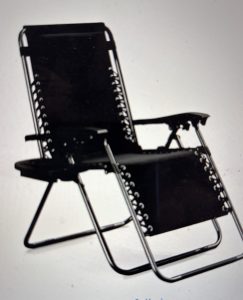
reclining lawn chair
please let me know if you have something like the chair pictured.
Thank you
Doug
3 days ago
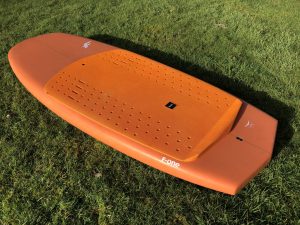
ISO F-One Rocket Wing 105L
I am looking for a F-One Rocket wing board that is 105L volume and 5'10" length. Have one to sell? Let me know!
Jim
3 days ago
F-One v2 Strike 4m
Looking for a 4m V2 Strike
Annalise
4 days ago
F-One Wingfoil Airplane "Upgrade"
Looking for my next F-One foil to upgrade to. Currently riding the Phantom 1280.
Curt
5 days ago
Sabfoil 799 or 950 front foil
Looking for Sabfoil 799 or 950 front foil, older models that use M6 hardware.
Jim
5 days ago
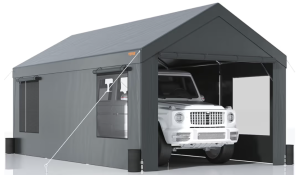
Carport /gear shed
Looking for a new to lightly used carport/gear shed.
Tony
7 days ago
Men's bike or e-bike
Looking for a large men's bike or an e-bike to do some basic riding
Bob Johnson
1 week ago
F-One 161 carving W tail
Looking for the 161 tail.
AG
1 week ago
95l-105l wingfoil board
Please lmk if anyone has a board for sale. Pick up around march 2.
Jennifer
1 week ago
Hybrid Mid-length wing board
Looking for 90-100l wing board (Hybrid/Mid-line)that take-off easily and relatively stable for intermediate progression still learning to go around the corner. Thank you.
Thane
1 week ago
Harness loop
I’m looking for a harness loop for my parawing.
THANKS
Casey
1 week ago
85ltr wing board
Iso 80-85l wing para wing board.
Jim
1 week ago
10m core kite
Used core kite in good conditions
Rafael
1 week ago
Armstrong Performance Mast 865 or 935
Looking for an Armstrong Performance Mast, either 865 or 935.
Aldo
1 week ago
Windsurf board 95 to 105 liters
Still windsurfing for ever
Marc André
2 weeks ago
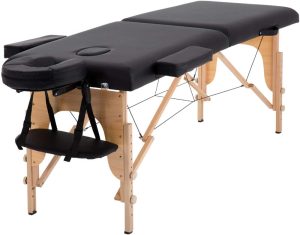
Massage Table
Hoping to find a massage bed/table..bonus if you have linens too.
Thanks!
Anna
2 weeks ago
Arms 780HA front wing
Looking for an Armstrong 780 HA front wing.
Ron
2 weeks ago
Winging helmet.
Looking for a helmet for winging, the ball cap style. Like bump
ROBBIE
2 weeks ago
Small air fryer
Looking for a small air fryer
ROBBIE
2 weeks ago
Portable propane fire pit
Looking for a propane fire pit
Bob
2 weeks ago
dog/house sitter
I am looking for a dog/house sitter for my dog in El Sargento.
Richard
2 weeks ago
How Do the Classifieds Work?
The Ventana View Classifieds is an easy to use system that helps you get in touch with other traders to swap goods. Here are some important features:
- No registration. No passwords – All you need to provide is an email address when you create your listing.
- Protects Your Privacy – As the creator of a listing, your email address is not displayed on the Classifieds. It will never be revealed.
- Email Confirmation and Approval – Create your listing and the system will email you a link to confirm it. Once you click the confirmation link, the listing will be sent to the Site Moderator for approval. Once your listing is approved it will appear here in the Classifieds and in the next published newsletter.
- Edit and Delete – If you make a mistake when creating your listing or you want to delete it from the Classifieds, you can do so by clicking the edit link in the original confirmation email (so save that confirmation email).
- It is the Conversation Starter. The Rest is Up to You – Get in touch with someone about their listing by clicking the envelope (✉️) next to their name. Fill out the form and the system will send an email to the creator of the listing. This message will include your email address and your message. So now the creator can respond to you directly.